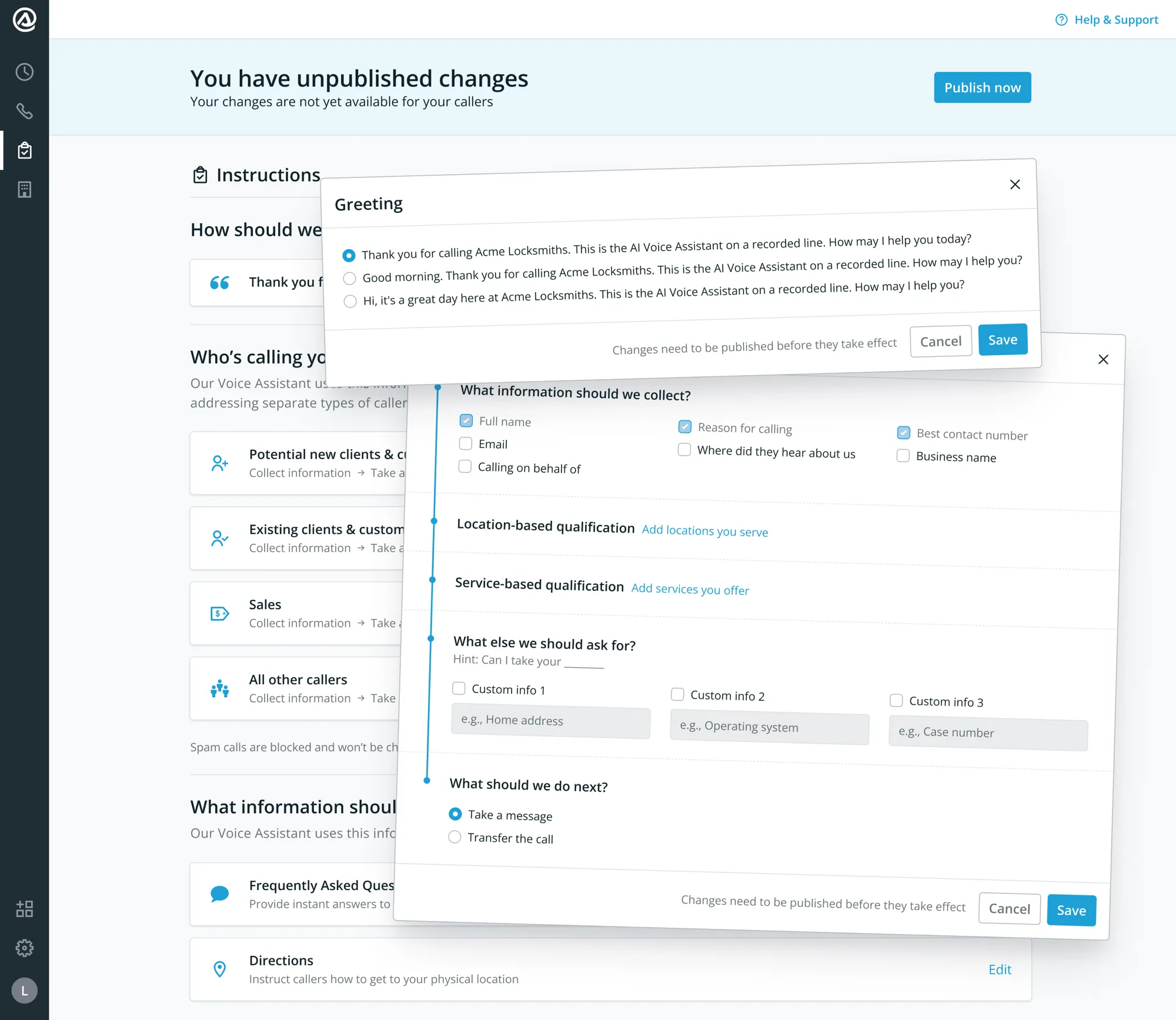
If I were to ask you to describe the structure and flow of the last phone call that you had, I bet you can’t. If you were presented with all the options to configure all of it I bet you still couldn’t.
It’s hard to solve the cold start problem in software. It’s even harder when you don’t have a mental model for describing what you want.
The most important aspect for me was to deliver an “aha” moment (and therefore value) as soon as possible after payment. I made sure that Smith’s AI Receptionist just worked right out of the box. That took time-to-value from weeks to minutes, and the self-serve model it enabled grew the product from zero to $4M ARR in two years.
Every new customer cost days of people’s work
Onboarding a new customer started with a Typeform. Not very professional. Not very scalable. Then followed a sales call, a discovery session, and a few days of human-led configuration before they could even try anything. That assumed the teams involved got it right on the first try. This process cost several people’s time (and the business money) every time.
That is the cost product-led growth had to remove. Smith.ai had already handled tens of millions of calls with trained human agents, so the model worked; it just couldn’t scale one customer at a time. Law firms were about 75% of the customer base on the human reception service, against 25% all others. We didn’t initially target law firms specifically; we accommodated their needs.
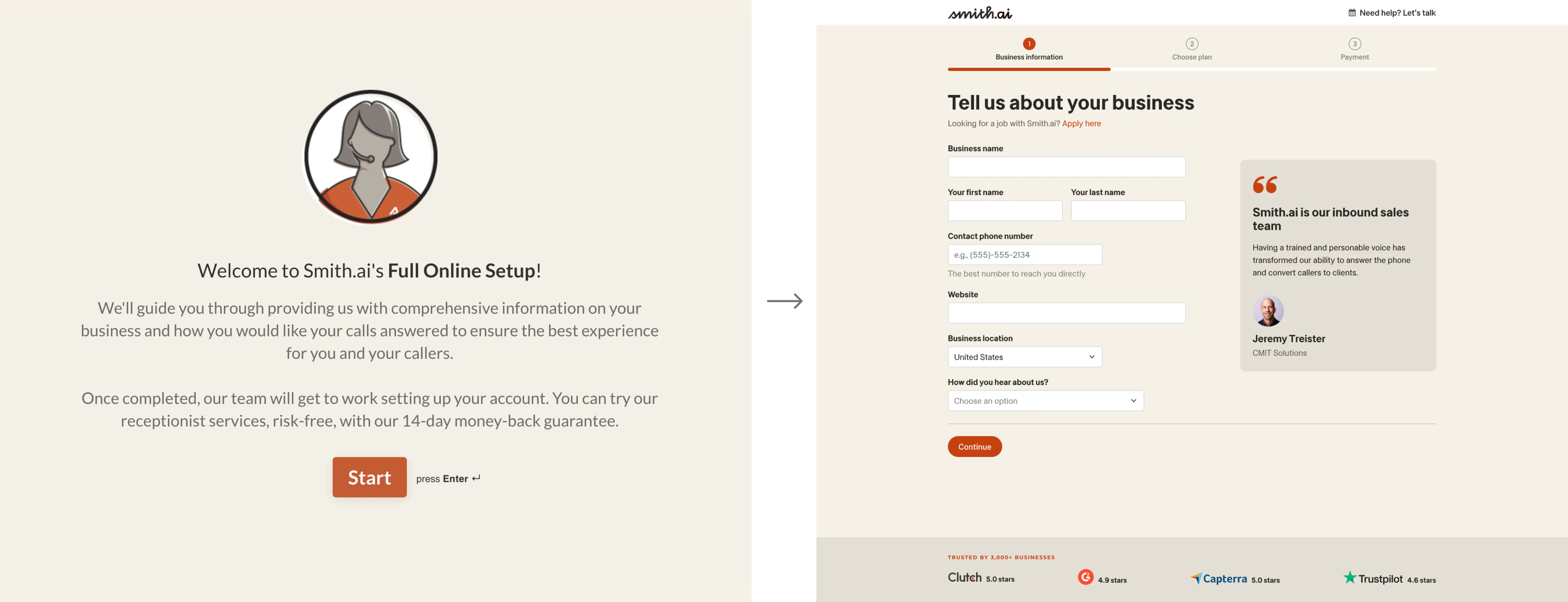
The goal was that a customer could sign up and speak to a working AI receptionist in minutes. My vision for this went further: given the technical capabilities of the target audience (1-20 person legal practices), I decided it should also “just work” with no setup after someone signed up. Call the number. Hear your AI receptionist answer the phone as if it were you.
Not only did I need to design the configuration experience on top of the existing human receptionist system (which shipped faster but meant all of the complexity came with it) but it also needed to live in the same dashboard used for said service. Imagine lots of if → else → display:none;. It also meant elements that were reused needed to stay where they were or we were duplicating interface elements only to hide them. Engineering did not like that idea. I knew we’d need to address IA at some point but needed to validate product market fit first. No sense prematurely optimising.
I designed the first version of everything. From the v1 onwards I continued mainly on configuration while a senior product designer iterated on sign-up and onboarding.
Every call had a unique set of instructions
Most voice-AI startups were building from scratch and inventing what ‘good’ sounded like. Smith.ai had already taken the calls, but each of them had a completely unique set of instructions. There was no mass migration possible at all so automated pattern analysis wasn’t going to work.
An effort on the operations and updates team had defined some structure for those calls, and had the manual call instructions follow that pattern. That work was already done, so I leaned on it.
I sat with human agents over two weeks. Shadowing their calls to listen to how they spoke to callers, how they handled data capture, how they answered when they didn’t know the answer. I validated all of this with early customers to ensure the flow met their expectations and needs.
The structure was five call stages (Greet, Listen & Identify, Gather, Qualify, Actions) and five common caller types.
Caller Types
- Potential new clients
- Existing clients
- Sales
- Spam
- All other calls
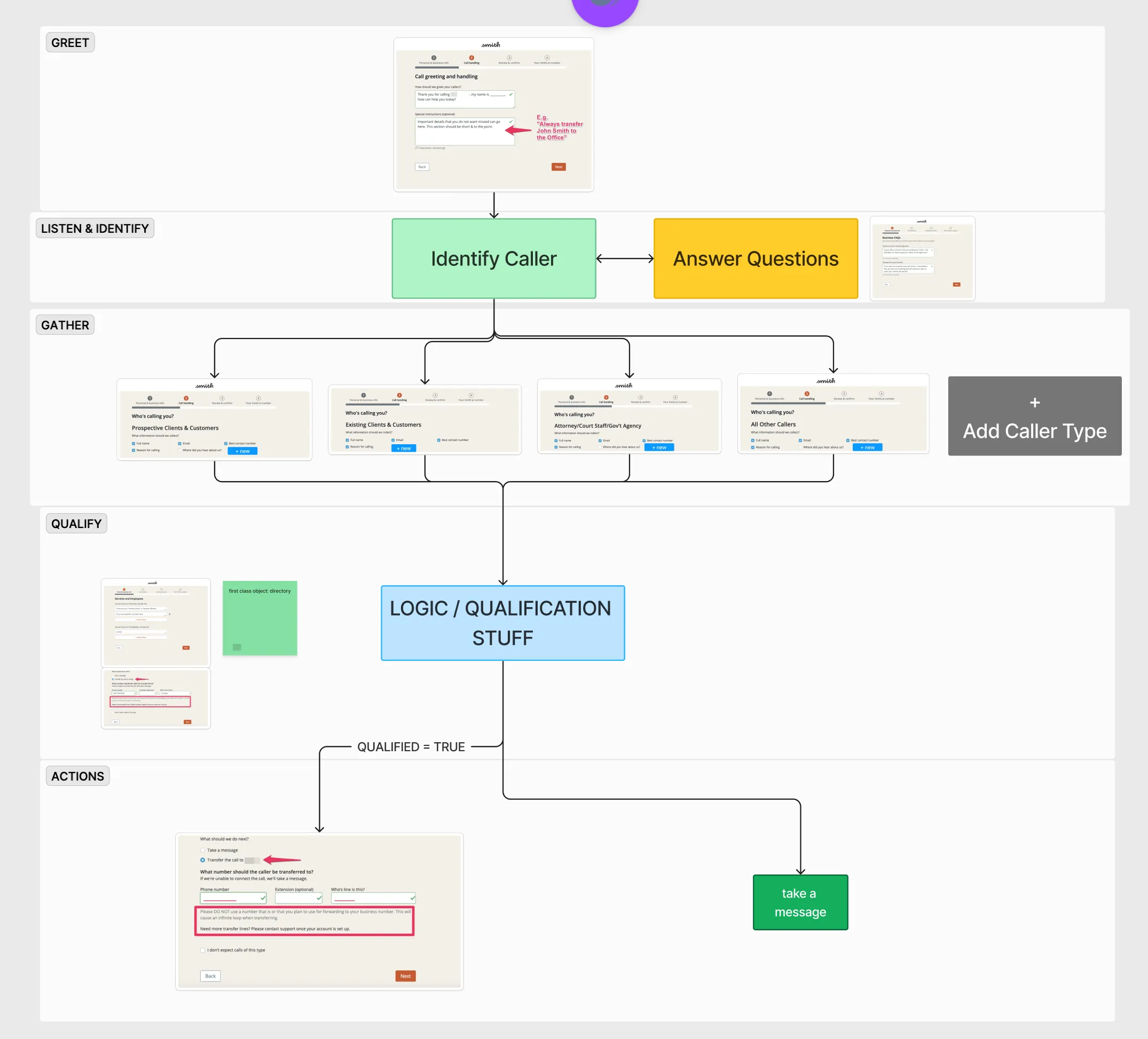
With the engineering team and access to Vapi, our orchestration tool, the CPO and I created demo accounts both using this flow (and also exploring other options), to see what gave the best results. This was before we had any sort of quality scoring or transcript sentiment evaluations, so it was a question of live demos, recordings and consensus to determine what sounded good.
The best results were for the AI when no flow was given, but a series of questions that needed to be answered in a specific order, and then operational instructions about how to request that information. Because the system needed to function both for our human receptionists and the AI, the instructions had to be written for a human, in an explicit order with explicit questions. Which is what we ended up with.
The existing receptionist service ran on a configuration system that was unique per customer and increasingly complex even for our internal teams. I couldn’t put that in front of a self-service customer at sign-up. They’d close the tab.
Stakeholders were excited to build a node-based flow for handling all of the complexity we had identified in the existing human receptionist service. I maintained that we needed something simple and approachable. People don’t think in node-based flows, they think in the order of a call.
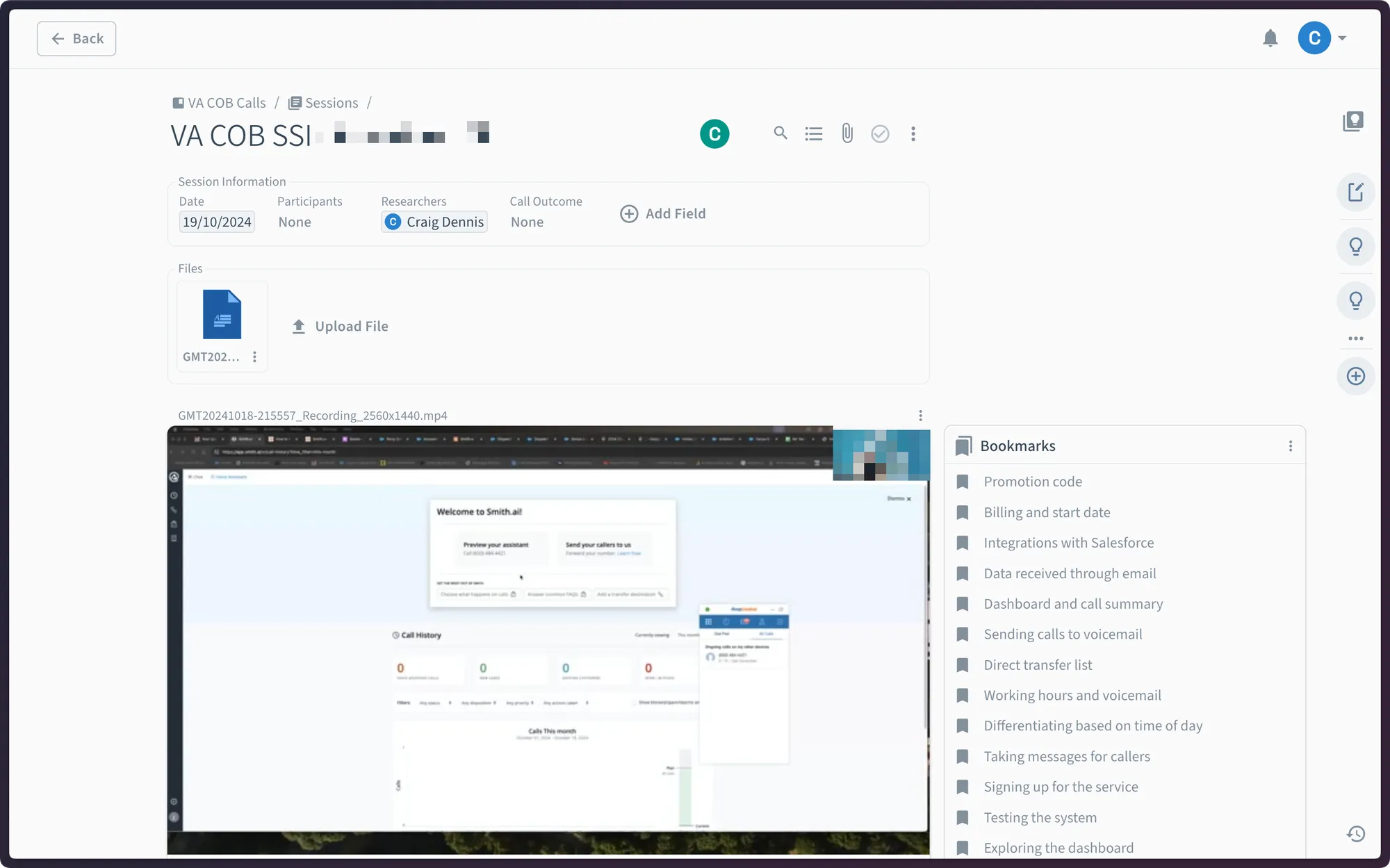
The Head of Product had the senior product designer prototype both options in Figma, a simple form-style configuration and a node-based flow builder, and tested them with three small-business owners he was already interviewing for broad product-market fit. He handed me the research with a recommendation: the linear flow was easier to understand, but the node-based flow was easier to understand once someone had experienced the linear one. The simple version was how people learned the advanced one.
I reviewed all of the research calls myself. I didn’t use the work the senior designer had produced, because it was produced in a vacuum and lacked the constraints the actual system operated under. My philosophy for avoiding the cold start problem is that the product should function immediately and signpost where to change things, rather than rely on an existing configuration. I took the recommendation, built the linear flow out, and presented it to the CPO.
The call had to read top to bottom
Early concepts converged on a linear flow in the configuration UI. Any branching (qualified versus disqualified, transfer versus capture) lived inside the structure, not as a separate flow the customer had to wire up.
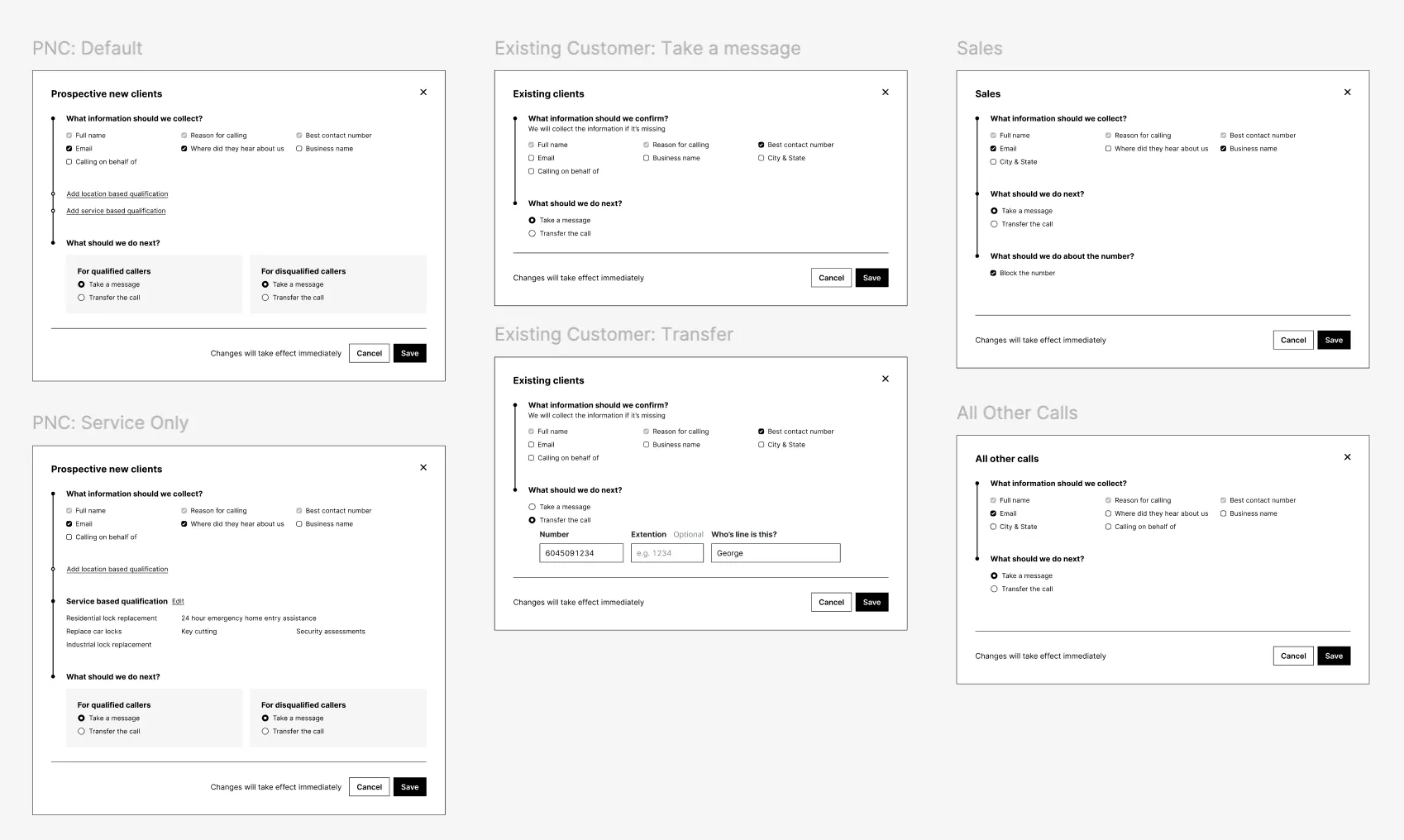
The most complex of the five patterns was potential new clients. It mattered most to get right because it tied directly to new revenue for our customers. Get it wrong and we’d cost them business, which is a hard objection to overcome once they’re deciding whether to cancel.
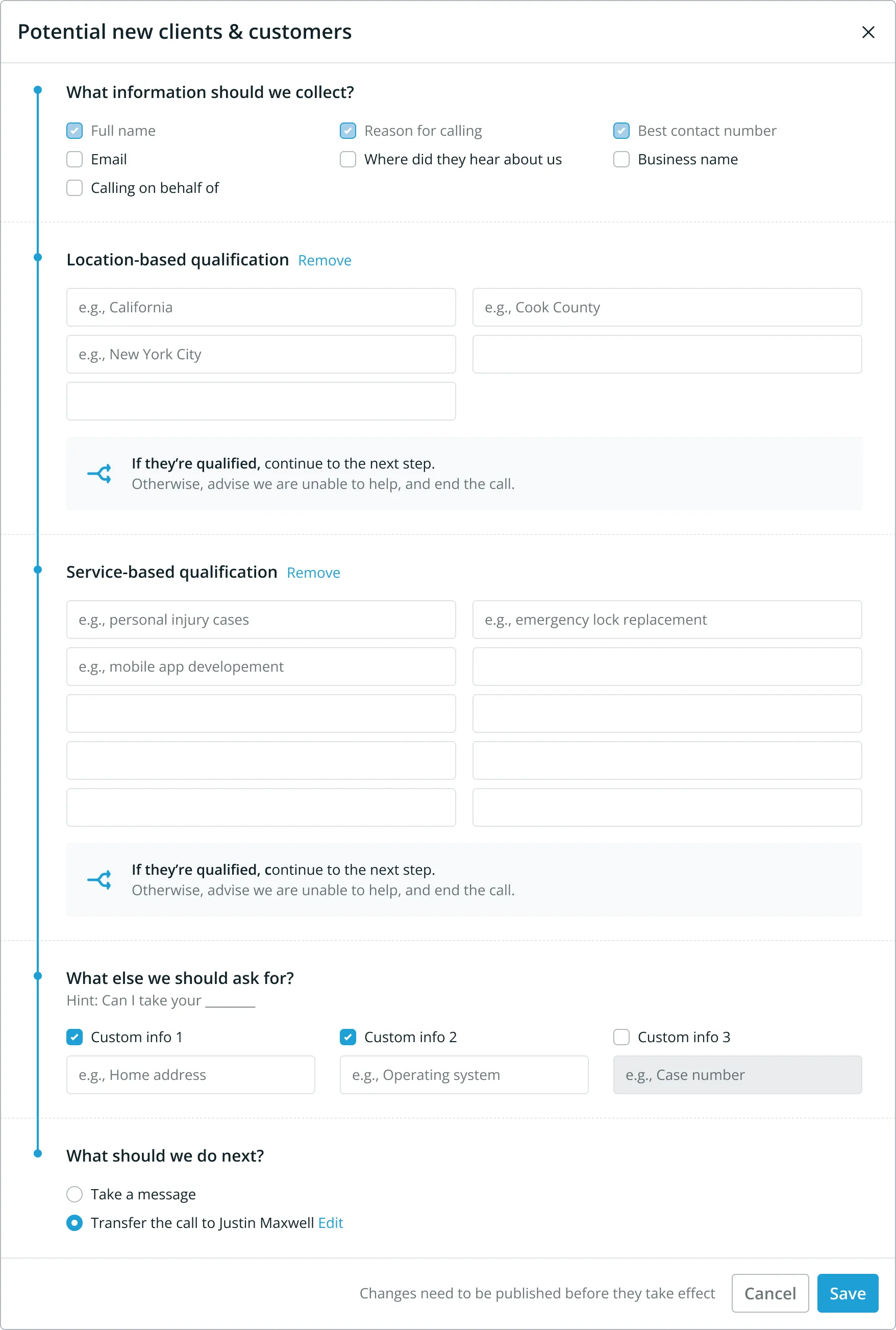
Qualify sat fourth in the structure I’d inherited, after Gather. A caller answered a run of questions and then got disqualified, having spent minutes giving information that led nowhere, and they were frustrated by it. We could hear it. We reviewed real calls in an internal tool, and the product team and I reached the same conclusion: qualification was landing too late. I moved qualification to the top of the flow for prospective clients. A caller who wasn’t a fit now found that out early instead of at the end.
Watching real calls also told me what makes a call feel like a call: turn-taking. A human gap between turns is 200 to 300 milliseconds; a two to four second pause reads as reluctance or a dropped line. Retrieval and tool calls introduced exactly that kind of delay, so I treated latency as a design constraint from day one, rather than something engineering would optimise away after launch.
Humans cover the gap when they look something up: they keep talking, draw out their speech, or you hear them typing. I gave the AI the same affordance, a set of natural holding phrases to pull from while a tool call ran.
Verification was the default I got wrong in the safe direction. The AI confirmed the information it had captured back to the caller at the end of the call, which felt like the responsible default. It frustrated callers instead: capture, transfer, then re-confirm the same details. I made it a setting, then turned it off by default for new customers. Nobody has ever turned it back on. Information accuracy mattered less to the call experience than I had expected it to.
Frustrated Caller became the primary measure of product health
The whole team reached all of that by listening together in the call-review tool, and that was enough to act on. But it was manual. We had the data (call lengths, caller types) and never analysed it. If I did this again I’d run weekly cohort analyses by caller type, to back up what we were hearing or point us somewhere different.
What we did evaluate against the transcript was data capture: how many data keys were populated by the AI, how many by a human, how many corrected by a human. There was one for abrupt call ending, where the call just ended with no attribution. And there was Frustrated Caller, a basic sentiment analysis on the call.
Frustrated Caller ended up being the primary measure of product health. It only showed us if a caller was frustrated. Not whether the caller achieved their goal, not whether they achieved the customer’s goal, not whether we provided any inaccurate information or went down any wrong paths, not whether we greeted them effectively. I had many conversations with the VP of Operations about this.
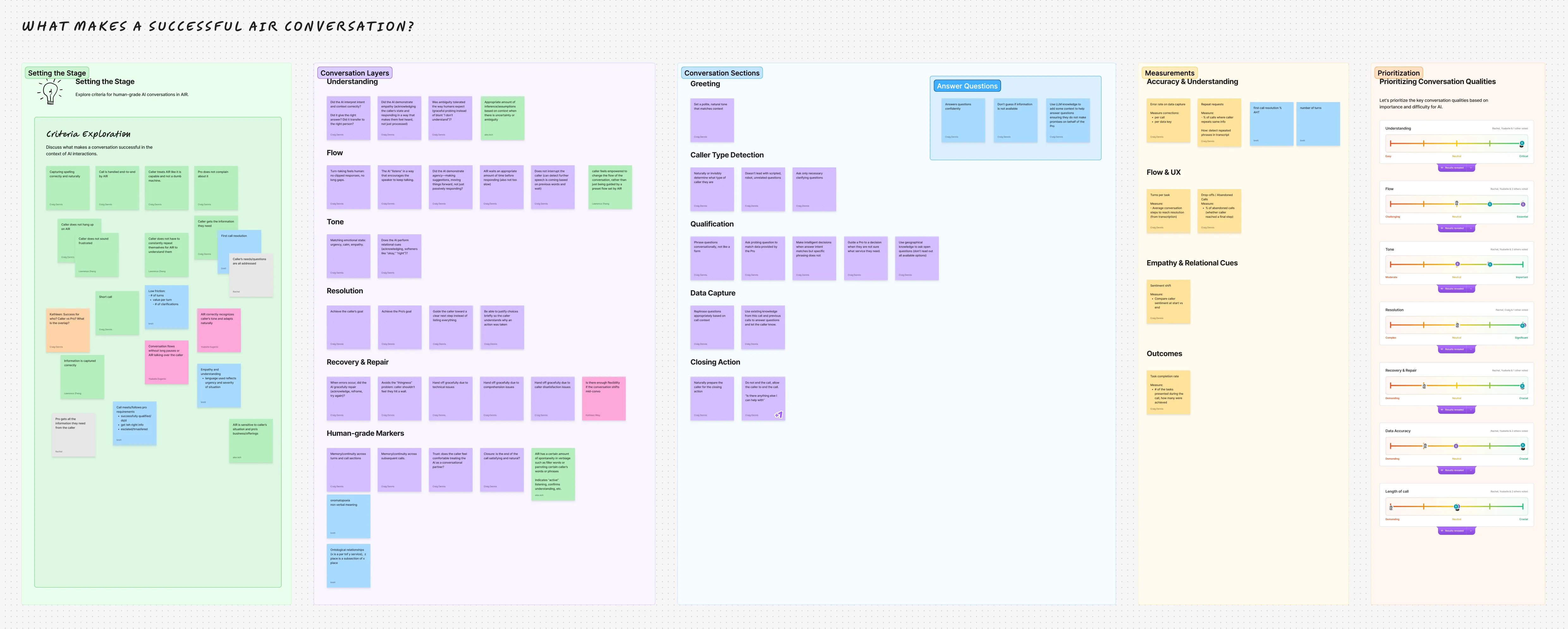
Later I ran a workshop to bring alignment to Product and Design on what a successful call was. Everyone had different ideas about how to improve the system: no cohesive language, no cohesive voice. My aim was to bring them all together so everyone could have their say, and we could then group the results and prioritise them. Out of it came the first conversations about the AI quality score and the strategy around measurement that I proposed.
The interface had to match the model in the customer’s head
The interface was simple because it matched the model in the customer’s head, not the architecture underneath. My goal: a customer signs up and can immediately call their AI, with zero configuration. No ‘set up your flow’ wizard, no configuration call, no support handoff to get them live. Sign-up captured everything I needed to pre-populate a working assistant (the business name), so the very first call wasn’t a tutorial. It was the AI representing the business, with the customer hearing exactly what their callers would.
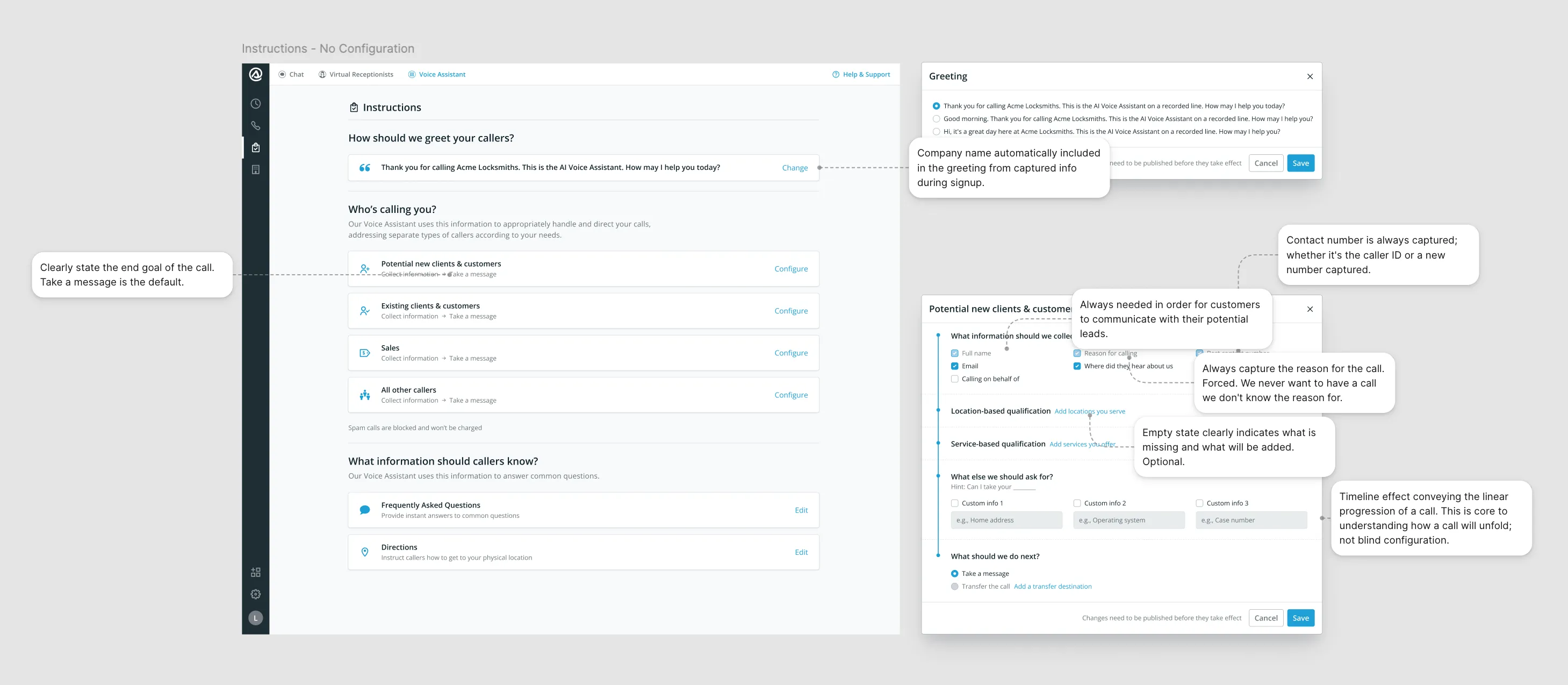
The principle I adhere to is simple: the product is the manual.
The configuration had a field for ‘what information do you want to capture from callers?’ I expected data keys: “date of accident”, “type of injury”, “court date”. These mirrored how we captured data on the human receptionist side. What customers actually did was write questions. “What date was the accident?” “Have you contacted another attorney?”
That looked harmless, but the AI read those entries as questions to ask verbatim, and explicit questions made the call worse than implicit capture. The call started to feel like an intake form being read aloud. Their mental model didn’t match the interface: they wanted to script the call; I wanted to capture information; two different goals landing in the same input field.
We were dogfooding the system ourselves too, on several demo lines and as the emergency call-in line for our receptionist staff, so we hit the same constraint while setting it up.
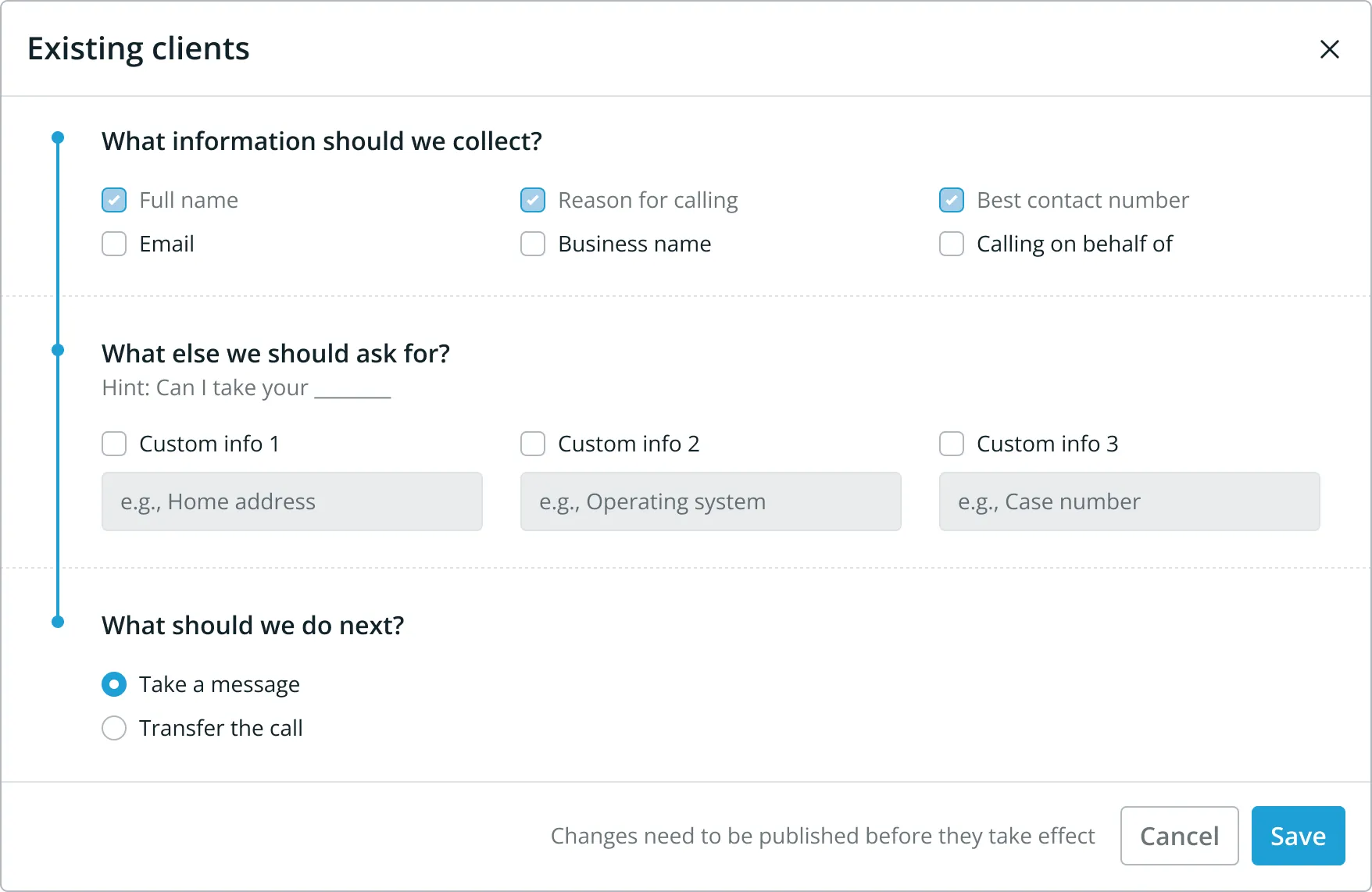
The fix had three parts. Reduce friction for the right input. Show a real example of what works versus what people commonly try. Add validation that recognised the wrong shape and offered a path back to the right one.
Those capture fields were data keys, dropped into the system prompt verbatim, so a question in one broke the call in unpredictable ways; the AI got confused, and the summary came back with a question in it. Engineering couldn’t solve that at the time, so the surface that was the easiest to change was the interface. I wrote the regex myself: it blocks a question but allows a statement, with a message that says you only add the information you need; we ask the question for you.
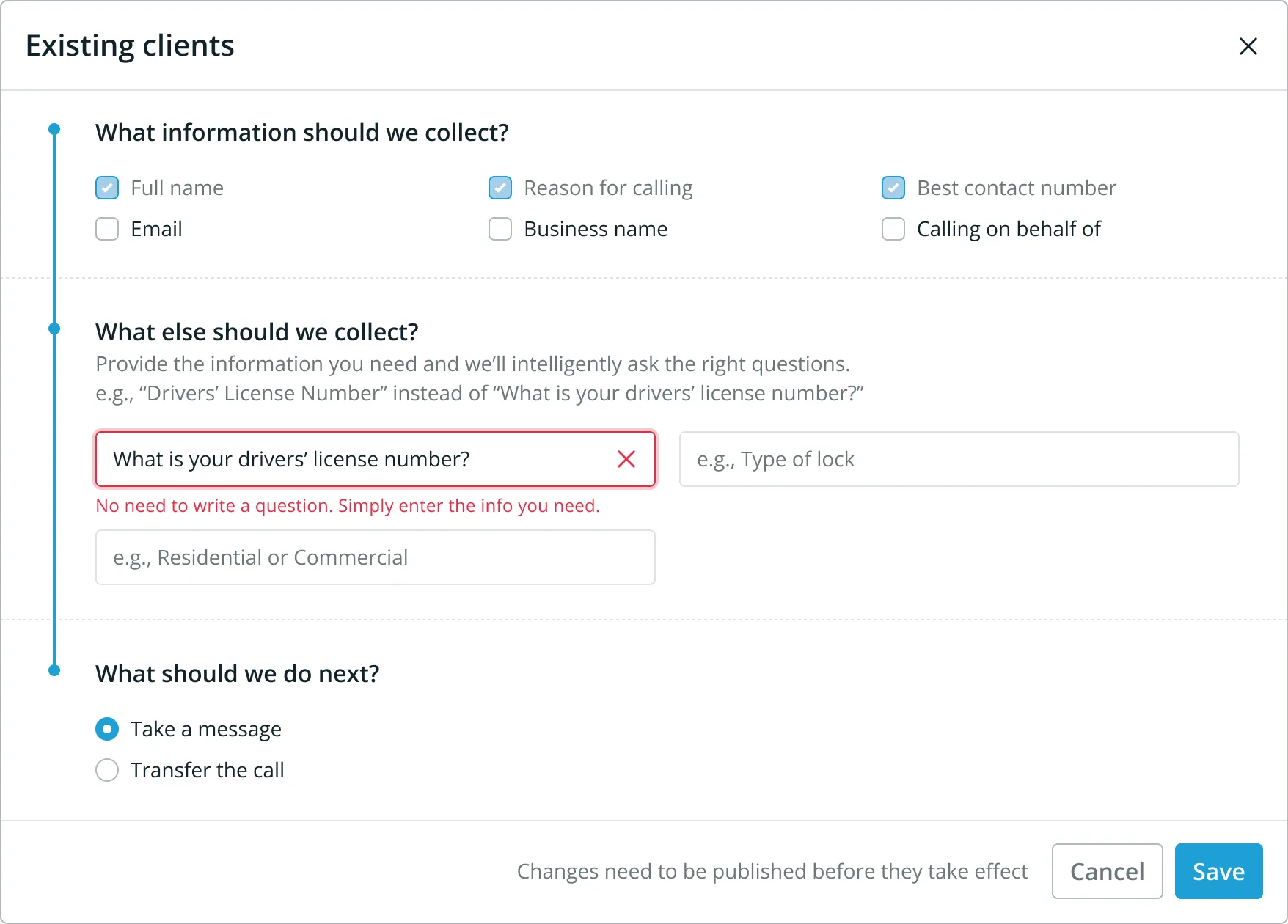
The capture field had a better answer than validation and helper text, and I knew it at the time. Given how capable LLMs already were, I wanted a translation layer that took the customer’s wording and generated the data label, so a customer could write “What date was the accident?” and the system would store the key “date of accident” without their ever thinking about the difference. I built a demo and put it in the backlog. In a small team there were higher-priority features, so it stayed there. I saw the better solution, built enough to prove it, and it lost the priority call.
The same mismatch showed up in publishing. The first version of configuration had a draft state and a manual publish: you changed something, then pressed publish to put it live. Customers expected the opposite. They assumed every change saved and went live the moment they made it, and they missed the publish step completely, banner and all. Engineering found a way to save every change live, and auto-save was the first thing we changed. Build the interface around the model in the customer’s head, because the one in the system underneath is invisible to them.
Defaults made a complex system safe to hand over
Zero-config works because I captured the minimum and set sensible defaults and guardrails for everything else.
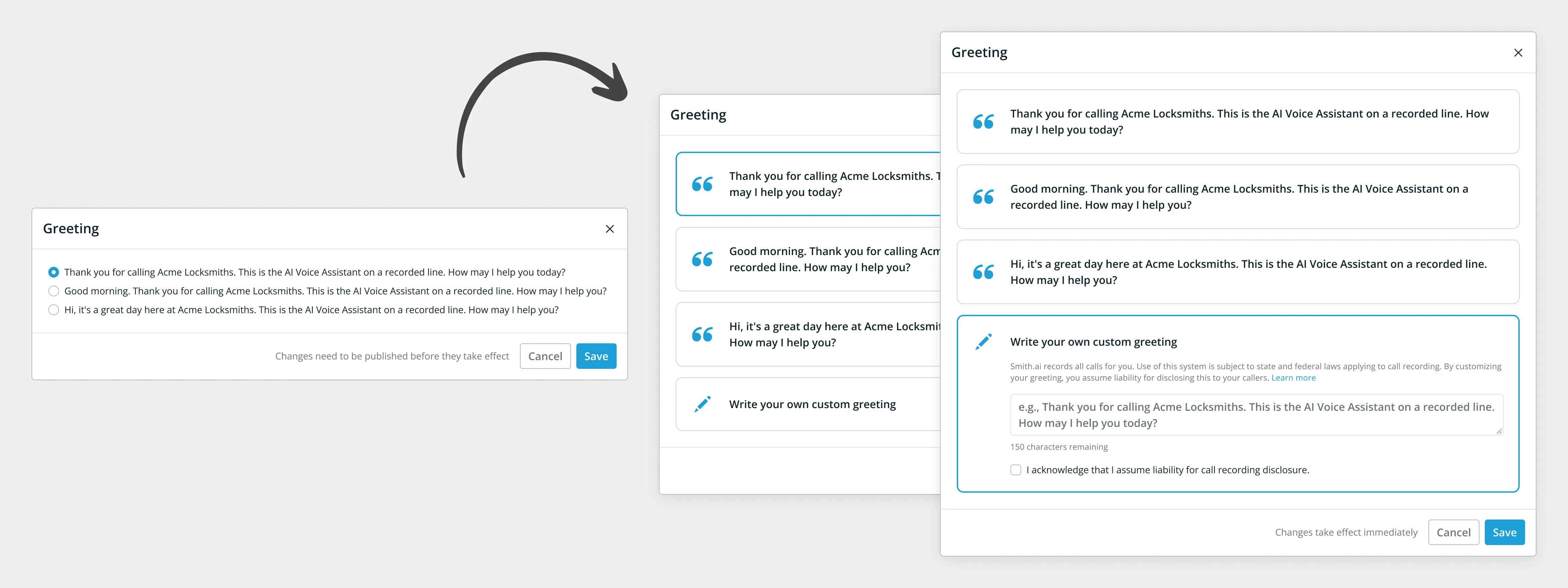
The greeting was the first thing a caller heard, so it was the first control I designed. I kept it prescriptive at first: three options to choose from, collected from real customers on the human service and confirmed with Product Marketing. Once I had feedback from customers, I opened it up to free text, with constraints.
The obvious move for the legal segment was to make the one flow conditional. I did the opposite.
The most common use case from the target legal practice size was either capture all their information and let them through, capture all their information and schedule an appointment, or capture all their information, make sure they need one of these specific services and are in a specific state, and then transfer them through. Variations of that theme. None of that required complex branching logic. All of it could be conveyed in a linear flow.
What it needed was allowing for the possibility that at any one of those junctures that could be conceived of as a branch, the answer could be no. So there’s a UI element at the end of those sections for when the answer is basically no.
The simplest mechanism was that we take a message and we pass their information on, and we tell them that we will pass the information on. That way the caller feels heard. We don’t give the caller incorrect information: the wording was closer to saying it doesn’t look like we can help in this specific case, but we’ll pass the information on in case we can, or in case we can refer them to another practice. Then we ask if there’s anything else they’d like to tell us, and end the call.
The customer got a summary sent by email with the disposition as disqualified, and a link to the dashboard where they could review all of the structured fields, listen to the full recording, and search the full transcript.

I added a single caller-type setting, so a customer who only ever gets one kind of call could switch off the existing-client question and the spam and sales branches entirely. Single caller types worked around some of the trouble I was having with the automatic caller-type detection based on “How can I help you?”, but they solved a real customer need in the meantime.
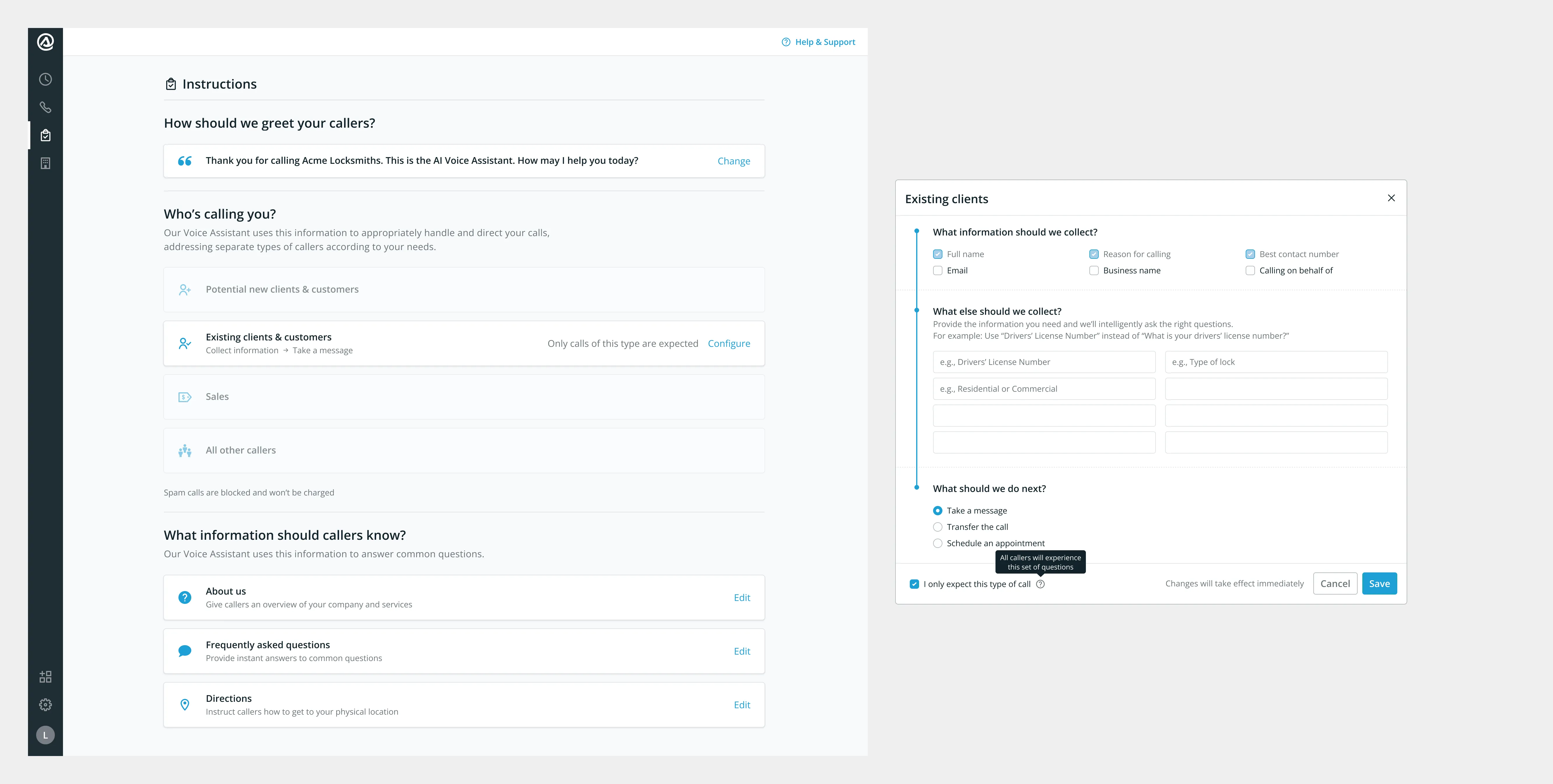
Because the publish step was dropped, the configuration had to be self-contained, which meant almost everything became a modal. That is where the caller-type setting lived, and there was only one place to put it that made sense: I broke a UX convention and put the checkbox in the footer of the modal. It was the only spot, outside the configuration itself, that kept the whole decision inside one self-contained view. The configuration still had to be represented in the dashboard; the product is the manual.
The strongest idea I had is one I never shipped
The strongest idea I had for the product is one I never shipped. The core system prompt, the instruction set the AI ran every call against, was too restrictive. As the underlying models improved, the caller experience stayed capped by a prompt written for weaker ones. I argued for a full re-evaluation, repeatedly, and I built demos to show what a looser prompt made possible.
The bet was never realised. The prompt was owned by an engineer, and when it was eventually revisited it was for cost and brevity, not the caller experience I was making the case for. I had the demo and the conviction; what I didn’t have then were the influencing skills to turn a working prototype into a priority.
The strongest reaction we ever got came from an early demo line, before the guardrails. A caller in the US asked about California trade law, whether they had to disclose something on their packaging. The AI answered; they asked a more detailed follow-up; it answered again. A completely natural conversation, where the caller forgot they were talking to an AI.
“Holy ****, whoever made this is a genius!” — a caller to our early demo line
I don’t think we ever captured that wow again. It came from the model answering a real question off its own knowledge, not from anything the customer had configured; the guardrails were what kept it from happening once the prompt took over.
What I’d do differently is instrument the case. The argument rested on demos and my own read of the calls; it needed caller-experience data sitting next to the cost-and-brevity numbers the decision was actually made on, so it wasn’t my judgement against someone else’s.
People were no longer the blocker
All of the human cost survived. It just meant we could tailor it to higher-value customers. Self-serve captured the lower end of the funnel, and anybody that needed higher volumes of calls was given the white-glove treatment. Sales still had a job. They would still be selling the service, and they would then ask customers to sign up using the self-serve. Larger accounts had an onboarding call to familiarise themselves with the software.
The important thing is that people were no longer the blocker for us getting customers and capturing revenue. A payment link had to be sent out by email previously. Now payment was in flow.
The voice assistant launched in late 2023, and the self-serve configuration was what let it grow product-led instead of sales-assisted, from zero to $4 million ARR in two years. Time-to-value went from weeks to minutes. Sign up, configure inside the flow, take real calls the same day.